
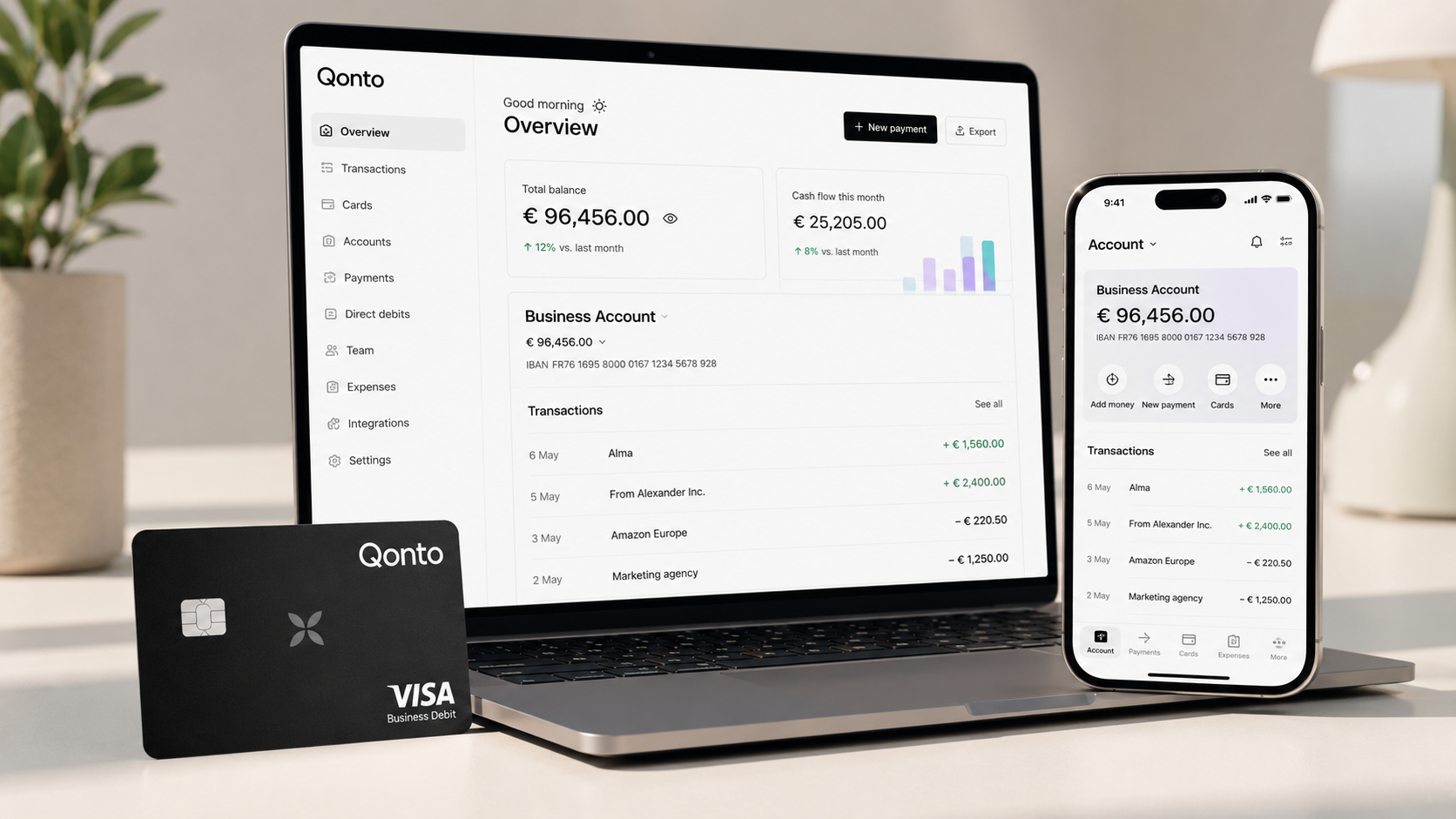

Freelancers waste roughly 8 hours every month wrestling with invoices, processing payments, and organizing financial records—time that should go toward acquiring clients or completing billable work. This administrative burden has driven professionals across Europe to seek solutions that actually fit their workflows rather than forcing them into legacy banking structures designed for large corporations. The Qonto Smart Business Account Plan has emerged as a genuine breakthrough for freelancers in Austria, Germany, and beyond, offering a financial management platform purpose-built for independent professionals who demand more than a basic checking account.
What separates Qonto from traditional banking institutions is its fundamental philosophy: it’s engineered specifically for professionals who need visibility, automation, and spending control without unnecessary complexity. The Smart plan occupies the ideal middle ground—comprehensive enough for growing micro-teams, yet accessible at a price point that makes sense for solopreneurs just establishing their financial infrastructure. Rather than padding feature lists with tools you’ll never use, this plan focuses on the elements that genuinely move freelance operations forward: streamlined transactions, flexible payment cards, and seamless accounting connections.
Explore how Qonto Smart can transform your financial management today.
Why Freelancers Need More Than Basic Business Banking
The difference between personal and business accounts for tax compliance and professionalism
Operating a freelance business from a personal bank account creates serious complications. Tax authorities expect clear separation between personal and business finances. When you mix deposits, expenses, and transfers across a single account, you’re not just creating accounting headaches—you’re inviting scrutiny during audits. A dedicated business account demonstrates professionalism to clients and provides the documentation needed for quarterly tax filings and annual returns.
How fragmented financial tools drain productivity and create accounting headaches
Most freelancers cobble together solutions: one app for invoicing, another for expense tracking, perhaps a spreadsheet for vendor payments. This fragmentation forces you to manually reconcile information across platforms, re-enter data multiple times, and cross-reference records when inconsistencies appear. The cognitive load alone exhausts mental bandwidth that could focus on revenue-generating work. A unified platform eliminates these friction points.
The risk of mixing personal and business expenses (legal, tax, and audit implications)
Commingling personal and business spending doesn’t just create inconvenience—it poses real legal exposure. If your business faces a liability claim or audit, regulators may scrutinize whether funds were properly separated and categorized. Additionally, mixing expenses makes it nearly impossible to claim legitimate business deductions, which directly reduces your tax efficiency. Financial separation protects you legally and maximizes your legitimate tax advantages.
Why traditional banks fall short for freelance cash flow management
Legacy banking institutions designed their systems around stable employment patterns and predictable cash flow. They offer minimal automation for freelancers managing irregular income streams, multiple client payments, and variable expenses. Their platforms lack integration with accounting software, require manual transaction categorization, and provide limited visibility into cash position across time. Modern platforms eliminate these constraints.
Breaking Down the Qonto Smart Plan’s Transaction and Card Features
Monthly SEPA transfer allowance (100 transfers) and what this means for freelancer payment patterns
The Smart plan permits 100 SEPA transfers monthly—a realistic ceiling for most freelancers. A solo consultant might average 10-20 client payments, 15-25 vendor invoices, and 10-15 tax or insurance payments, landing comfortably within this threshold. If you’re paying multiple team members, contractors, or managing clients across several projects, the 100-transfer allowance accommodates this activity without forcing you into overages. For freelancers with exceptionally high transaction volumes, this becomes a consideration point, but most independent professionals operate well within this boundary.
Two physical One Card Mastercards: practical use cases for personal vs. business spending
Having two physical cards enables intelligent spending separation. One card handles business expenses—vendor payments, software subscriptions, equipment purchases—while the second remains dedicated to project-specific spending or team reimbursements. This physical separation makes expense tracking intuitive and reduces the temptation to commingle personal purchases with business accounts. The Mastercard network ensures acceptance across vendors and international merchants.
Virtual card creation (up to 50 cards) and how freelancers can leverage this for client projects, subscriptions, and vendor management
This feature transforms how you manage spending categories and vendor relationships. Create dedicated virtual cards for specific clients, projects, or subscription vendors—you can assign spending limits to each card and instantly identify which projects consumed which resources. For freelancers managing multiple concurrent projects, this visibility eliminates the need for spreadsheet reconciliation. You might create one card for a long-term retainer client, another for software subscriptions, and additional cards for specific vendor relationships. If a card number is compromised, you can instantly deactivate just that card rather than replacing a physical card and updating all your merchant relationships.
Spending controls and team member access without adding overhead costs
The Smart plan enables granular permission management—you can invite contractors or employees without adding unnecessary administrative burden. Assign specific spending limits, restrict card access to certain vendors, and receive real-time notifications when thresholds are approached. This control prevents overspending while maintaining team autonomy.
Accounting Integration and Sub-Account Organization for Self-Employed Professionals
One dedicated sub-account feature for expense categorization and project-based accounting
The single sub-account allows you to segregate expenses by project, client, or cost category. Rather than batching all expenses into one bucket, you maintain separate accounting streams that feed directly into your tax preparation process. A content creator might maintain one sub-account for production expenses and another for client reimbursables. A consultant could allocate sub-accounts by engagement. This structure transforms year-end accounting from a painful reconstruction of scattered transactions into a simple review of pre-organized data.
DATEV, Lexware Office, and sevdesk integration: streamlining tax preparation
These integrations matter immensely for Austrian and German freelancers. DATEV compatibility ensures that transaction data flows directly to your accountant without manual export-import cycles. Lexware Office users benefit from automatic synchronization of invoices and expenses. sevdesk integration automates the entire invoicing-to-accounting pipeline. Rather than exporting CSV files quarterly and manually importing them into accounting software, data syncs continuously, reducing errors and preparation time.
Dedicated accountant access and secure document sharing capabilities
Accountants can access your account directly during tax season, viewing transactions, invoices, and expense documentation without requesting files from you. This parallel access accelerates the preparation process and reduces back-and-forth communication. Secure document sharing eliminates email chains of scattered receipts and invoices.
E-invoicing functionality and how it accelerates payment collection
Built-in e-invoicing reduces the friction between delivering work and receiving payment. You generate invoices directly within Qonto, send them electronically, and track payment status in real-time. Clients who prefer digital invoices appreciate the professionalism and convenience. The streamlined process accelerates cash collection—studies show that electronic invoices reduce payment cycles by several days compared to email attachments.
Discover how Qonto’s accounting integrations simplify your tax season today.
The Interest Rate Incentive: Understanding Qonto’s Balance Remuneration Model
4% AER for the first two months: how this rewards early deposits and cash reserves
Qonto offers 4% annual equivalent rate for the first 60 days after account opening—a genuine incentive to establish cash reserves immediately. A freelancer depositing €5,000 earns approximately €33 in interest during this promotional period. While this isn’t life-changing income, it offsets the platform’s subscription cost and rewards prudent financial management. This promotional window encourages freelancers to build emergency reserves right from account inception.
1% ongoing interest on balances up to €50,000: realistic earnings for freelancers
After the promotional period, the rate drops to 1% AER on balances up to €50,000. A freelancer maintaining €30,000 in business reserves earns approximately €25 monthly, or €300 annually. This isn’t substantial, but it’s more than traditional savings accounts offer. The key advantage is that your operational capital generates returns while remaining readily accessible for business needs—no separate savings account required.
How balance remuneration compares to traditional savings accounts
Conventional savings accounts in Austria and Germany typically offer 0.25-0.5% on business deposits. Qonto’s 1% ongoing rate nearly doubles this return. Combined with the promotional 4% period, Qonto rewards cash accumulation more generously than legacy banking. For freelancers building business reserves, this meaningful difference accumulates over months and years.
Strategies for maximizing interest while maintaining operational liquidity
The challenge is balancing interest earnings against operational needs. Freelancers should maintain sufficient working capital to cover monthly expenses and unexpected costs, with the remainder earning the 1% rate. If you earn €3,000 monthly and maintain three months of reserves (€9,000), the remaining balance earns interest. As your business grows and cash position increases, the interest component becomes more meaningful. Strategic cash positioning—maintaining adequate operational reserves while letting surplus capital earn returns—optimizes both security and income.
Pricing Transparency: When €19/Month Becomes Your Real Cost
Annual billing (€19/month) vs. monthly billing (€23/month): the commitment trade-off
Annual billing at €19/month represents €228 yearly. Monthly billing costs €276 annually—a €48 premium for flexibility. For freelancers with established income streams, annual commitment makes financial sense. Those uncertain about long-term platform compatibility should start with monthly billing and switch to annual after confirming satisfaction. The difference amounts to roughly four hours of billable work annually, putting the choice in perspective.
Hidden costs: transaction overages, additional team members, and premium features
Exceeding 100 SEPA transfers monthly triggers €0.50 per additional transfer. Adding team members beyond the included allowance costs extra. Premium features like advanced analytics or specialized integrations may require upgrades. These costs remain modest for most freelancers, but they deserve consideration if your operation approaches any limits. A freelancer managing 150 monthly transfers pays an additional €25 monthly—meaningful enough to warrant attention.
Scaling costs as your freelance business grows and transaction volume increases
The Smart plan accommodates modest growth gracefully. As your transaction volume approaches 100 transfers, you face a decision: optimize your processes to stay within limits, pay for overages, or upgrade to a higher tier. Similarly, adding team members increases costs incrementally. Planning for growth ensures you choose the right tier at inception rather than discovering limitations mid-year.
ROI calculation: time saved on accounting vs. monthly subscription cost
At €19 monthly (€228 annually), the platform requires recovering roughly 28 hours of accounting work yearly to break even—approximately 2.3 hours monthly. Most freelancers waste considerably more than this on manual financial management, invoicing, and expense tracking. The integration with accounting software alone typically saves 3-4 hours quarterly during tax season preparation. For virtually all self-employed professionals, the platform delivers positive ROI within the first months of use.
Security, Compliance, and What Freelancers Should Know About Payment Institution Status
Qonto as a payment institution vs. traditional bank: what this means for fund protection
Qonto operates as a payment institution regulated by financial authorities, not as a traditional bank. This distinction matters for fund protection. While Qonto maintains separate customer fund accounts distinct from operational reserves, these funds don’t fall under the Deposit Guarantee Fund that protects traditional bank deposits up to €100,000. However, Qonto implements robust security measures and maintains insurance coverage. For freelancers operating with modest balances (under €50,000), this represents minimal practical risk. Larger operations should consult their accountant regarding any concentration concerns.
Separate fund holding and security measures (though not Deposit Guarantee Fund coverage)
Qonto segregates customer funds from company operational accounts, ensuring that even if the company faces financial difficulty, customer funds remain protected. This separation is legally mandated and independently audited. Security protocols include encryption, multi-factor authentication, and fraud monitoring. While not equivalent to deposit guarantee coverage, the practical security level exceeds many expectations.
GDPR compliance and data privacy protections for sensitive financial information
Qonto commits to GDPR compliance and maintains privacy certifications appropriate for financial data handling. Your transaction history, account details, and connected accounting information receive protection under European data regulation standards. Terms clearly outline how data is used and retained. For Austrian and German freelancers, GDPR compliance aligns with local expectations and regulatory familiarity.
Fraud protection and dispute resolution processes
Qonto provides fraud monitoring that identifies suspicious transaction patterns and alerts you immediately. Dispute resolution processes follow standard payment institution protocols—if an unauthorized transaction occurs, you can initiate a chargeback or dispute. The platform’s real-time notification system enables rapid response to suspicious activity. Most users report that suspicious transactions are detected and flagged faster than traditional banks.
Customer Support and Real-World Problem Resolution for Freelancers
7-day-a-week customer service availability and response times
Qonto maintains 24/7 customer support across seven days weekly, which removes the frustration of traditional banking hours. Whether you encounter an issue on Sunday evening or Thursday morning, support availability remains consistent. For freelancers managing clients across multiple time zones, this accessibility proves invaluable.
Support channels: chat, email, and phone accessibility
Multiple support channels accommodate different communication preferences. Live chat provides immediate assistance for urgent issues. Email suits detailed questions requiring documentation. Phone support connects you with specialists for complex problems. Most routine issues resolve within minutes through chat.
Trustpilot ratings and what actual freelancer reviews reveal
Qonto maintains strong Trustpilot ratings, with the majority of reviews praising the platform’s intuitive interface and responsive support. Negative reviews typically cite transaction overage costs, complexity scaling to enterprise-level needs, or difficulty resolving edge-case issues. The overall sentiment strongly favors Qonto for the freelancer demographic. Reading actual user reviews provides valuable perspective on real-world experience.
Onboarding experience and how quickly freelancers can go live
Account creation completes entirely online and typically finishes within 24-48 hours. You provide identification verification, business details, and banking information through the application. Qonto’s streamlined process avoids the document requests and delays endemic to traditional banks. Most freelancers receive approval and can begin transactions within two business days.
The Smart Plan in Action: Real Freelance Use Cases
Solo consultant managing multiple client projects with virtual card separation
A management consultant juggling three concurrent client engagements can create dedicated virtual cards for each client. One card receives the monthly retainer payment and accumulates project expenses. Another card handles a fixed-fee project where you want explicit tracking of spending against the engagement budget. The third card covers the client’s reimbursable expenses. At project completion, the financial trail is already organized by engagement, transforming year-end accounting from nightmarish to straightforward. You can also set spending limits per card, preventing accidental overspending on client budgets.
Freelance designer handling vendor payments and subscription management
A graphic designer managing Adobe subscriptions, cloud storage services, stock photo libraries, and freelance contractor payments benefits from virtual card organization. One card handles design software subscriptions, another covers cloud infrastructure, a third manages contractor payments. When you review expenses by vendor category, the pattern becomes immediately visible—you might discover you’re spending more on stock photos than necessary or identify underutilized subscriptions. This visibility drives cost optimization decisions.
Content creator tracking sponsorships, affiliate income, and production expenses
A YouTube creator managing multiple income streams and production costs can segregate accounts by income source and expense category. Sponsorship income deposits to the main account, affiliate income flows to a dedicated sub-account, and production expenses accumulate in another sub-account. When tax season arrives, your accountant has a pre-organized view of revenue sources and corresponding expenses. The integrated invoicing system also simplifies client billing for consulting work or brand partnerships.
How the platform scales from side hustle to full-time independent business
The Smart plan grows with your business from initial side projects through full-time independence. As transaction volumes increase, you can add team members with appropriate spending limits. When you hire contractors, you maintain control while delegating authority. If your business reaches complexity warranting higher-tier plans, migration carries no penalty. Most importantly, you develop organized financial habits and infrastructure from the beginning, making eventual scaling clean and straightforward.
Weighing the Tradeoffs: Smart Plan Limitations and Honest Considerations
Transaction quotas and what happens when you exceed 100 SEPA transfers monthly
If your business consistently exceeds 100 monthly transfers, you’ll pay €0.50 for each additional transfer. A freelancer processing 150 monthly transfers spends €25 extra monthly. This becomes a real cost if you’re operating above the quota, but it’s worth calculating whether you can optimize processes to stay within limits or whether the modest overage cost is acceptable against the time value of those transactions.
Lack of integrated lending or financing solutions for larger freelance investments
If your business reaches a point requiring equipment financing or working capital loans, Qonto doesn’t offer integrated solutions. You’ll need to seek financing through separate channels. This limitation matters primarily for freelancers contemplating significant business investments—purchasing a vehicle, equipment, or expanding into physical office space. For most solopreneurs and micro-teams, this represents a non-issue.
Geographic limitations (primarily EU-focused, less ideal for international freelancers)
Qonto excels for freelancers operating within Europe but offers less elegant solutions for those managing international clients and multi-currency transactions. While international transfers are possible, they incur standard wire fees and currency conversion charges. Freelancers managing significant USD, GBP, or other foreign currency business might benefit from platforms offering multi-currency accounts or specialized international services.
The learning curve for freelancers unfamiliar with fintech platforms
The interface is genuinely intuitive, but freelancers accustomed to traditional banking may require a brief onboarding period. The platform’s sophistication—virtual cards, sub-accounts, integrations—requires some exploration to leverage fully. Most users navigate competently within hours, but it’s not literally zero learning curve. Qonto provides tutorials and onboarding materials addressing this.
Making the Decision: Is Qonto Smart Right for Your Freelance Business?
Freelancer profile assessment: transaction volume, team size, and accounting complexity
Honest evaluation starts with understanding your operation’s characteristics. Monthly transaction volume determines whether the 100-transfer allowance fits your patterns. Team size indicates whether you need multi-user management. Accounting complexity—number of invoices, expense categories, tax jurisdiction requirements—reveals whether integrated accounting tools justify the cost. A solo consultant with 15 monthly transactions and minimal expense tracking might find the Basic plan sufficient. A freelancer with multiple projects, team members, and tax complexity benefits from Smart’s comprehensive feature set.
Checklist for evaluating whether Smart meets your specific needs
- Do you maintain a separate business account? (Yes → Smart makes sense)
- How many SEPA transfers do you process monthly? (15-80 → Smart comfortable; 100+ → may exceed limits)
- Do you manage multiple projects or clients simultaneously? (Yes → virtual cards valuable)
- How many team members or contractors do you manage? (1-3 → Smart sufficient; 4+ → consider higher tiers)
- Do you use accounting software? (Yes → check integration compatibility)
- How much time do you currently spend on financial administration? (3+ hours monthly → Smart likely pays for itself)
- What’s your typical business cash position? (€5,000-€50,000 → interest remuneration meaningful)
Alternative platforms and how they compare on features, pricing, and user experience
Qonto competes directly with platforms like Wise, N26 Business, and traditional banks offering business accounts. Wise specializes in multi-currency transactions and international payments. N26 Business offers similar features at comparable pricing but with less accounting integration. Traditional bank accounts provide deposit guarantee protection but lack Qonto’s modern interface and automation. Each choice involves different tradeoffs—evaluate based on your specific priorities.
Questions to ask yourself before committing to an annual plan
- Am I confident this platform matches my financial needs for the next 12 months?
- Can I commit to the €228 annual subscription without budget strain?
- Have I reviewed actual user reviews and confirmed the platform integrates with my accounting software?
- Does my business volume justify the Smart tier, or would Basic prove sufficient?
- Am I comfortable with the payment institution regulatory structure rather than traditional bank status?
The Bigger Picture—Building Financial Resilience as a Freelancer
How proper financial infrastructure reduces stress and improves decision-making
Freelancers operating without organized financial systems suffer constant anxiety. You don’t know exact profitability, can’t identify your strongest clients, and face chaotic tax season preparation. Proper infrastructure—integrated banking, automated categorization, real-time visibility—eliminates this ambient stress. You approach business decisions with actual data rather than guesswork. This clarity breeds confidence and enables strategic thinking.
The connection between organized accounting and sustainable pricing strategies
Most freelancers underprice their services because they lack visibility into actual costs and profitability. When you can instantly see how much you’re spending on subscriptions, contractor payments, and other overhead, you understand the minimum revenue required to sustain your business. This knowledge informs pricing negotiations and project selection. A designer might discover that certain project types carry costs she’d underestimated, enabling more accurate quoting.
Using cash flow visibility to identify peak earning periods and plan for slow months
Real-time financial reporting reveals cyclical patterns in your business. You might identify that summer months slow while autumn accelerates. Spring might bring heavy project loads while winter presents challenges. Understanding these patterns enables intelligent planning—building cash reserves during peak periods, planning marketing during valleys, or scheduling vacations during predictable slow seasons. Without visibility, you’re flying blind through your own business cycle.
Building business credit and financial credibility for future opportunities
Organized financial records and a dedicated business account establish credibility with potential lenders, partners, and enterprise clients. When you require business financing, equipment leasing, or seek partnership opportunities, your historical financial records matter. Qonto’s platform creates this documentary trail automatically, positioning you for future growth opportunities.
Your Path to Streamlined Freelance Finances
The Qonto Smart Business Account Plan delivers genuine value for freelancers who’ve outgrown personal banking but aren’t yet ready for enterprise-level complexity. At €19 monthly (annually), it’s an affordable entry point into professional financial management. The combination of transaction allowances, virtual cards, accounting integrations, and interest incentives creates a compelling package—especially when you factor in the hours reclaimed from manual bookkeeping.
That said, this isn’t a universal solution. Freelancers with minimal transaction volumes might find the Basic plan sufficient. Those managing teams or handling six-figure revenues may eventually outgrow Smart’s limitations. The real power emerges when you align the plan’s features with your actual workflow: if you’re invoicing clients, paying vendors, tracking expenses across projects, and preparing quarterly tax filings, Smart becomes an operational necessity rather than a luxury.
The decision ultimately hinges on whether you value time and financial clarity enough to invest in infrastructure. For most freelancers navigating the complexities of self-employment, Qonto Smart answers that question with a resounding yes.
Start your Qonto Smart application today and transform how you manage your freelance business.